How to Trade Equities on the CS Alpha App

Created by Eniola Osadare, Modified on Wed, 19 Jun, 2024 at 1:05 PM by Eniola Osadare

To trade equity on the CSAlpha app, follow these steps:

Step-by-Step Guide

  1. Login to Your Account

    • Open the CSAlpha mobile app on your device.
    • Enter your username and password.
    • Click on the "Login" button.
  2. Access Securities Trading

    • Once logged in, navigate to the main dashboard.
    • Click on the "Securities Trading" option.
  3. Navigate to Trade Direct

    • On the menu on your left, click on "Trade Direct."
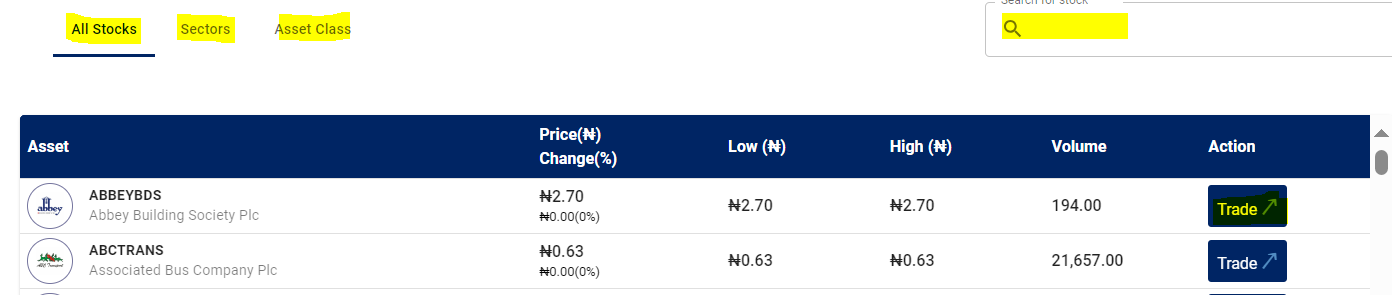
  4. Search for a Stock

    • Use the search bar to find your preferred stock.
    • Once you have found the stock, click on the "Trade" button.

5. Initiate a Trade

  • Select “Buy” or “Sell” based on your intended transaction.
  • Choose the order type:
    • Market Order: Buying at the best available price in the market.
    • Limit Order: Setting your preferred price to buy.
  • Input the number of units you wish to trade.

6. Confirm the Trade

  • Click "Continue" and review your transaction details.
  • Confirm your purchase or sale.
  • Upon confirmation, a mandate placement notification will be sent to your registered email address.

Important Information

  • Market Hours: The stock market opens at 10:00 AM and closes at 2:30 PM, Monday to Friday.
  • Trade Cancellation: If a trade does not go through, remember to cancel it. Not canceling may result in the trade being executed when the market opens next.
  • User Interface: Our user interface is very intuitive and provides all the information you need before sending your trade to the floor for execution.
  • Direct Exchange Connection: The CSAlpha app is directly connected to the exchange, ensuring all trades get executed provided there is a matching counterparty.

Additional Information

  • Ensure you review all stock information carefully before making a trade.
  • For any issues or further assistance, contact our support team.

Thank you for choosing CSAlpha for your investment needs. We are here to help you achieve your financial goals.


If you need further assistance, please do not hesitate to reach out to our customer support.

Was this article helpful?

That’s Great!

Thank you for your feedback

Sorry! We couldn't be helpful

Thank you for your feedback

Let us know how can we improve this article!

Select at least one of the reasons
CAPTCHA verification is required.

Feedback sent

We appreciate your effort and will try to fix the article